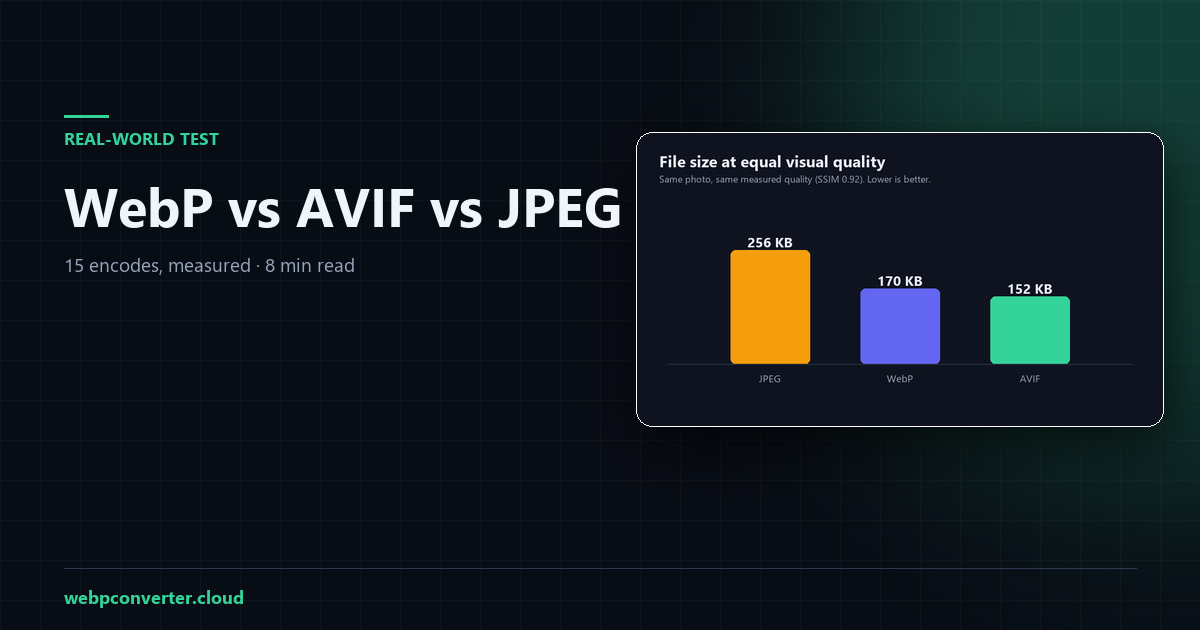
The short answer
- AVIF is the smallest at equal visual quality — 41% smaller than JPEG, 11% smaller than WebP.
- WebP is the best practical choice for websites — 34% smaller than JPEG, ~97% browser support, and it encodes in the browser.
- JPEG is still the compatibility answer — for email, print and old software.
The interesting part is why most comparisons get this wrong, and it comes down to one mistake: comparing the quality number on the slider.
How I tested
One 2400 px photograph, centre-cropped to 1600 × 1067 (the size a blog hero image is actually displayed at), then encoded at quality 50, 60, 70, 80 and 90 in each format. Fifteen encodes. The lossless PNG is the reference.
For each output I measured:
- File size — the actual bytes produced.
- PSNR — peak signal-to-noise ratio in dB. Higher is closer to the original.
- SSIM — structural similarity, 0 to 1. This tracks human perception better than PSNR, so it is the number I use for comparisons.
Encoder: Pillow 12.3 (libjpeg-turbo, libwebp, libavif). Any real encoder will differ in the second decimal — the trend is what matters.
Result 1: at the same quality setting
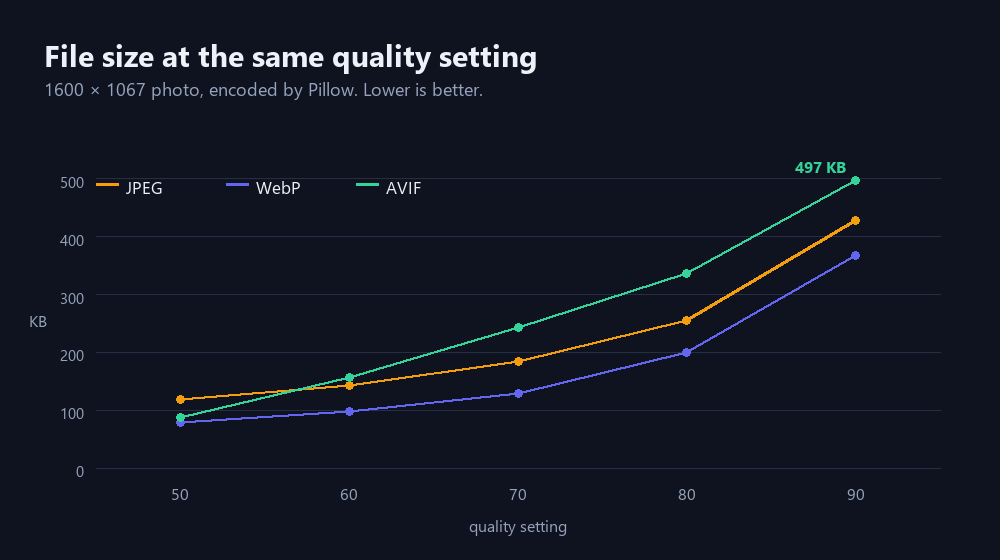
Same slider number, three very different results.
This is the chart that makes AVIF look bad — and it is also the chart most people are implicitly looking at when they say a format is "heavy". Look at quality 80: JPEG is 256 KB, WebP is 199 KB, and AVIF is 336 KB.
AVIF looks like the loser. But that reading is wrong, because the quality number is not a shared scale. Each encoder means something different by "80".
| Format | Quality | Size | PSNR | SSIM |
|---|---|---|---|---|
| JPEG | 50 | 119 KB | 33.0 dB | 0.872 |
| JPEG | 60 | 143 KB | 33.4 dB | 0.882 |
| JPEG | 70 | 184 KB | 34.1 dB | 0.898 |
| JPEG | 80 | 256 KB | 35.3 dB | 0.920 |
| JPEG | 90 | 428 KB | 38.4 dB | 0.958 |
| WebP | 50 | 79 KB | 33.1 dB | 0.864 |
| WebP | 60 | 98 KB | 33.7 dB | 0.879 |
| WebP | 70 | 129 KB | 34.5 dB | 0.900 |
| WebP | 80 | 199 KB | 36.5 dB | 0.934 |
| WebP | 90 | 368 KB | 41.0 dB | 0.976 |
| AVIF | 50 | 87 KB | 33.7 dB | 0.884 |
| AVIF | 60 | 156 KB | 35.6 dB | 0.922 |
| AVIF | 70 | 243 KB | 38.0 dB | 0.954 |
| AVIF | 80 | 336 KB | 40.4 dB | 0.972 |
| AVIF | 90 | 497 KB | 43.8 dB | 0.988 |
1600 × 1067 photo. PSNR and SSIM measured against the lossless original.
Result 2: at the same visual quality
To compare fairly you have to equalise what your eye sees, not what the slider says. I took SSIM 0.92 as "visually identical" and interpolated the file size each format needs to reach it.
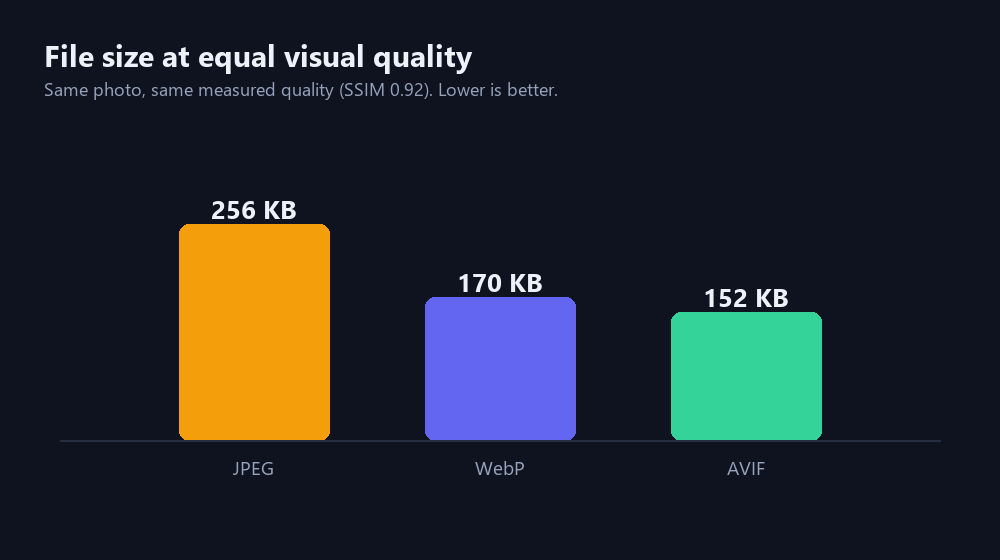
Same photo, same measured quality. Lower is better.
- JPEG needs 256 KB to reach SSIM 0.92.
- WebP needs 170 KB — 34% less for the same fidelity.
- AVIF needs 152 KB — 41% less than JPEG, 11% less than WebP.
That is the real comparison. AVIF wins on bytes, WebP is close behind, and JPEG is a third larger than AVIF for the same picture.
The gap between WebP and AVIF is also much smaller than the marketing suggests: 11%, not 50%. For a 200 KB image that is 18 KB — real, but not worth breaking compatibility for on its own.
Why does AVIF look worse on the first chart?
Because AVIF's quality scale is calibrated differently. At quality 60 it already reaches SSIM 0.922, while JPEG needs quality 80 to reach 0.920. Put them at the same number and AVIF is doing far more work — so of course the file is bigger.
This is also why "compress this image to quality 80" is a meaningless instruction across formats, and why a size target (like the one our compressor uses) is a better way to specify what you want.
So which should you use?
For a website: WebP. 34% smaller than JPEG, supported by roughly 97% of browsers in use, and — the part that rarely gets mentioned — modern browsers can encode it locally. That is why this site can convert your images without ever uploading them. Canvas cannot encode AVIF, so an AVIF converter either uploads your file or ships a several-megabyte WASM encoder.
If you control the pipeline and every byte counts: AVIF, with WebP or JPEG fallback. A CDN that transcodes for you is the sane way to do this. Doing it by hand means maintaining three versions of every image.
For email, print, archives and old software: JPEG. Nothing else opens everywhere, and 41% smaller is irrelevant if the recipient cannot see the picture.
What this test does not prove
- One photograph. I ran a second image too and the ordering held, but a flat illustration or a screenshot behaves differently — those favour PNG and lossless modes.
- Encoder versions drift. libavif improves every year; these numbers are from Pillow 12.3 in late 2026.
- SSIM is a proxy. It correlates with human judgement well, but it is not human judgement.
- Speed is not measured here. AVIF encoding is markedly slower — on this machine a single q80 encode took seconds versus milliseconds for WebP. For a one-off conversion that is fine; for a build pipeline of 10,000 images it is not.
Try it on your own image
The numbers above are one photo. Your photo may compress differently — a night sky and a brick wall are not the same problem. Convert a few of your own and compare the before/after sizes:
- JPG to WebP — the conversion this article recommends for websites
- Compress to 100 KB — when a form gives you a hard limit
- Image Compressor — quality or target-size compression, in any format